

How To Remove Windows 7 Password With Cmd
Bypass Windows 7 Login Screen and Admin Password
"I'thousand new to a figurer with Windows 7. I don't take a Windows password, and I always get presented with the logon screen where I take to click my username to log in with a password. I'm not sure whether something I've installed has made information technology do this. Just is there a uncomplicated mode around it? I only have one user account (which has admin rights) and no password on information technology. Thanks in Advance."
This is a trouble from a forum and too a common issue we have to bargain with unremarkably. In general, we simply demand to bypass Windows 7 password login without countersign. Here will listing three ways for you to featherbed Windows vii login screen no affair you lot have default administrator privileges or not.
- Bypass Windows vii login countersign with reset disk
- Bypass Windows 7 login countersign in rubber fashion with CMD
- Bypass Windows vii admin countersign to login without disk
Way ane: Featherbed Windows 7 Login Password with Reset Disk
Windows 7 password reset disk is dedicated to resetting or removing Windows 7 countersign when you forget on login screen. And 1 reset disk only works for i user account on Windows computer.
ane. Offset your Windows 7 computer and connect information technology with password reset deejay.
2. Choose the user account on Windows 7 login screen if you lot know which account the disk is created for.
If not, please try 1 by one on login screen. Find out the relevant account to remove its login password.
3. Blazon an incorrect password intentionally for login user and click OK if it is prompted incorrect.
4. Then click on Reset countersign link under countersign box to open Countersign Reset Wizard.
5. Tap on Next and cull the inserted password reset disk. Click on Next.
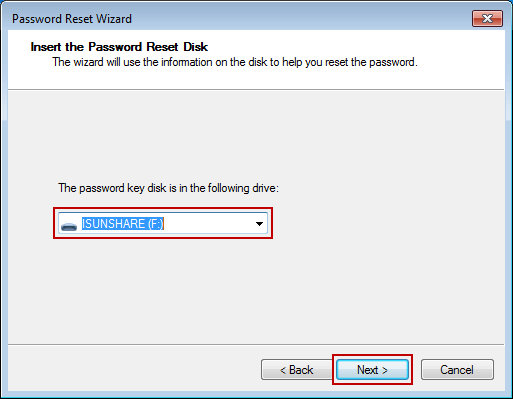
6. Don't blazon anything in password input field while you are asked to reset password for login user.
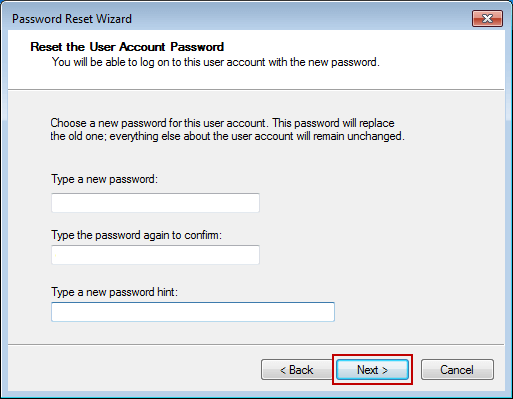
seven. Simply click Adjacent and Finish, and the Windows vii login password will be removed.
Mode 2: Bypass Windows 7 Login Password in Rubber Mode with CMD
By default, built-in administrator is created and set up disabled, just has no password protection in Windows calculator. While you run Windows seven figurer normally, it will not be plant and used. Withal, if you can run your Windows seven in rubber style with command prompt, it will run command prompt to remove Windows vii login password.
In Windows vii figurer, there are iii different types of prophylactic modes to cull, Safe Mode, Safety Mode with Networking and Safe Mode with Command Prompt. In society to make full use of command prompt to bypass Windows 7 login countersign, delight choose the tertiary one.
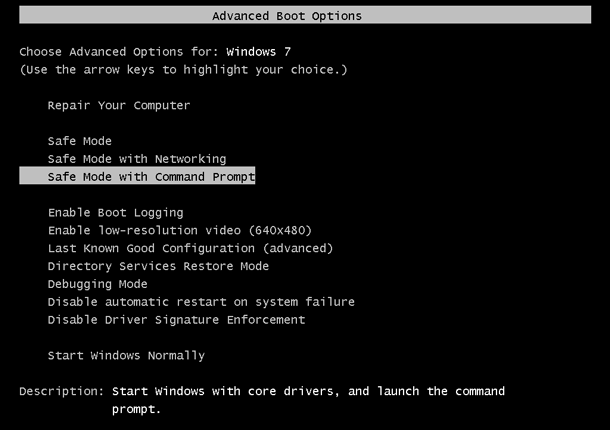
Step 1: Restart your Windows seven reckoner and hold on pressing F8 to enter Avant-garde Kick Options.
Step 2: Cull Condom Style with Command Prompt in the coming screen and press Enter.
Step 3: In pop-up control prompt window, blazon cyberspace user and hitting Enter. Then all Windows 7 user accounts would exist listed in the window. Just find the login user which always appeared once again and once again on Windows seven logon screen.
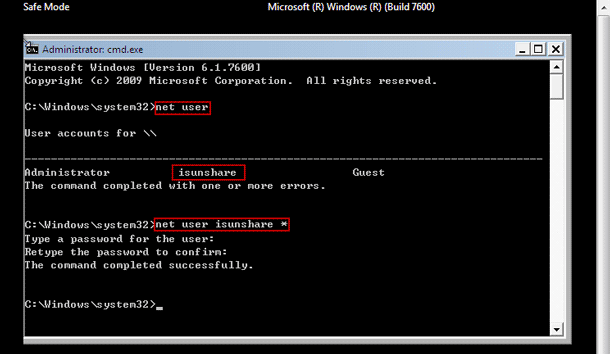
Pace iv: Remove Windows 7 login user countersign with net user command.
For example, if the login user is "isunshare", merely need to type command "net user isunshare *" in command prompt window and press Enter button iii times. And so Windows 7 login user password would be removed. Restart computer unremarkably and you could featherbed Windows 7 login countersign to sign in.
Way 3: Featherbed Windows seven Admin Countersign with Recovery Utility
If all of above methods cannot piece of work for your Windows 7 computer, delight think nigh the third-party Windows vii password removal tool, iSunshare Windows Password Genius. It can directly remove Windows 7 countersign for all of user accounts on a locked reckoner. So it is normally used to remove and bypass Windows vii admin password to login. Simply two easy steps are required to bypass admin countersign in Windows 7 without login.
Step one: Fire Windows 7 password reset disk with writable USB flash drive.
The Windows 7 countersign recovery tool allows anyone to burn a password reset disk on an accessible Windows reckoner with bootalbe USB drive or CD-ROM.
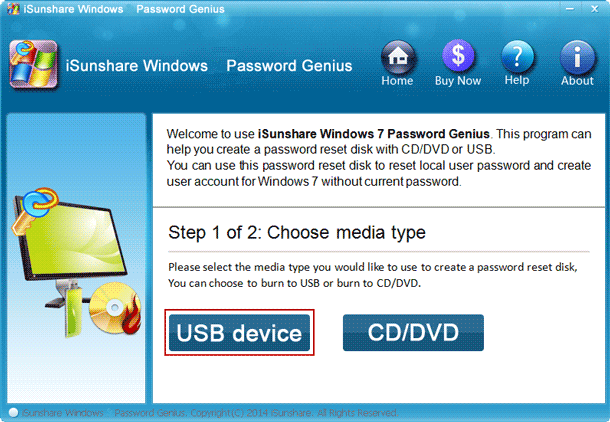
- Insert bootable USB wink drive into attainable computer and run Windows 7 Password Genius.
- Select the removal device and click Brainstorm burning button.
- Format the USB flash drive and fire password reset deejay into it.
- Exit USB wink drive later on successfully burning.
Step 2: Remove and bypass Windows seven admin password to login computer.
- Plug USB recovery disk into your locked Windows seven reckoner.
- Gear up Windows 7 computer to boot from USB flash drive.
- Windows Password Genius runs on locked computer and show all the Windows 7 user accounts.
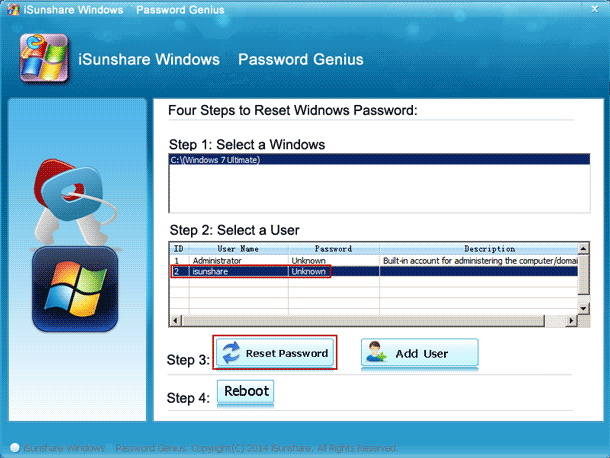
- Select the login ambassador in user list, and click Reset Countersign push.
- Click Yep push button to confirm to remove Windows seven admin countersign.
- Tab Reboot button to restart locked Windows 7 computer, and eject USB recovery disk in fourth dimension to kicking calculator normally from hard drive.
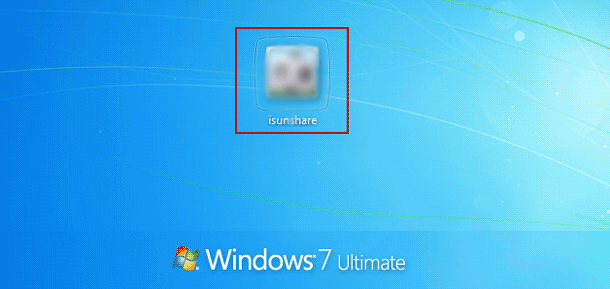
On Windows 7 logon screen, simply click the administrator and you could login Windows vii computer successfully without admin password. Information technology means y'all have successfully bypassed Windows 7 admin password to admission reckoner.
Related Manufactures:
- Windows 7 Admin Password Reset
- Forgot Windows 7 Password and Take No Disk | How to Go in
- Remove or Bypass Windows viii/viii.1 Admin Password
- How to Featherbed Windows x Password Login with/without Password
Source: https://www.isunshare.com/windows-7-password/bypass-windows-7-logon-screen-and-admin-password.html
Posted by: jonesbatione.blogspot.com
0 Response to "How To Remove Windows 7 Password With Cmd"
Post a Comment